

Meta Description: Update outdated drivers safely in one click with Driver Booster. Discover its features, safety protections, and performance benefits in 2026.
Keeping your PC stable and performing at its best in 2026 requires more than occasional maintenance—driver updates are essential. Outdated or faulty drivers can cause system crashes, hardware issues, game lag, and compatibility problems with modern software.
That’s where IObit Driver Booster stands out. Designed for simplicity and safety, it allows users to scan, update, and fix driver-related issues in just one click—while ensuring updates are reliable and risk-free.
But is it still worth using today? Let’s break it down.
Part 1: What is Driver Booster?
IObit Driver Booster is an automated driver updater built for everyday users, gamers, and professionals who want a hassle-free way to keep their systems up to date.
The software automatically scans your system, detects outdated or missing drivers, and updates them instantly—no manual searching required.
One of its biggest strengths is its massive driver database, which includes over 18 million drivers from 1,200+ verified manufacturers, including Intel, NVIDIA, AMD, HP, Dell, and more.
In recent versions, Driver Booster has evolved beyond simple updating by adding:
- Game-ready driver optimization
- Faster update engines
- Improved hardware compatibility detection
- Enhanced backup and restore systems
Part 2: Powerful Features of Driver Booster
Driver Booster offers amazing features and capabilities, making it one of the best tools to update all your outdated drivers in one click. Here are the top features of this program:
- One-Click Updates: With a single click, users can update all outdated drivers at once—saving time and eliminating manual effort.
- Fix System Issues: The standout feature of this tool is that it can repair faulty drivers and resolve common issues, such as game lags, stuttering, poor resolution, no internet connection, no audio, slow performance, and more.
- Massive Driver Database: Powered by IObit, Driver Booster provides access to over 18 million drivers, including Graphic, Sound, Internet, Printer, Scanner, USB, Bluetooth, Game, and more.
- Game Optimization Support: Driver Booster is particularly popular among gamers thanks to game-ready driver updates, reduced stuttering and crashes, and better GPU performance.
- Enhanced Safety & Reliability (Key Upgrade): Safety is one of the most emphasized improvements in recent versions:
- WHQL-certified drivers + IObit Test validation ensure every update is stable and trustworthy
- Automatic system restore point creation before updates
- Driver backup system allows easy rollback if needed
- This dual-layer protection significantly reduces the risk typically associated with driver updates.
- User-Friendly Interface: The clean, intuitive interface makes it easy for beginners to manage drivers without technical knowledge.
Part 3: Benefits and Drawbacks of Using Driver Booster in 2026
Like any other tool, Driver Booster offers hundreds of benefits but also has certain limitations. Here are the top pros and cons of this program:
Pros
- One-click update for all outdated drivers
- Strong safety system (WHQL + backup + restore points)
- Fixes common PC and gaming issues effectively
- Large and frequently updated driver database
- Beginner-friendly with automation features
- Noticeable improvements in gaming and system stability
Cons
- Driver Booster offers a free version. However, this version of the program has limited features as compared to the paid ones.
Part 4: How to Update All Outdated Drivers in One Click
Using Driver Booster is quick and straightforward:
- Download and install the program from the official website
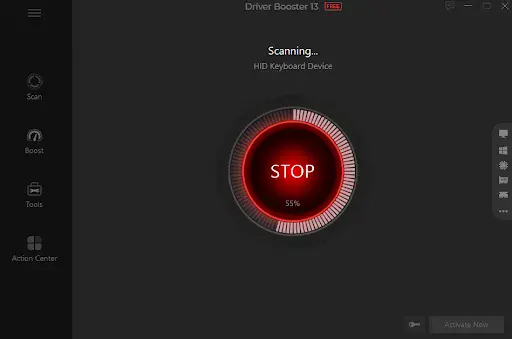
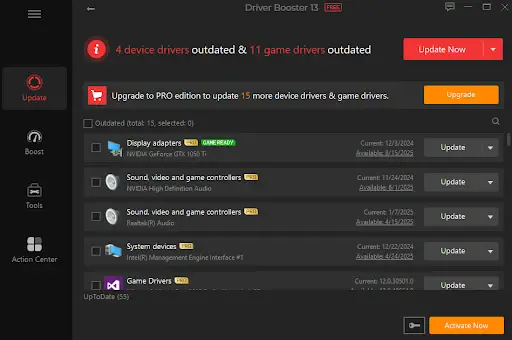
- After the scan is complete, Driver Booster will give you a complete list of all outdated drivers you need to update. Select the “Update All” button to begin the updating process in a single click.
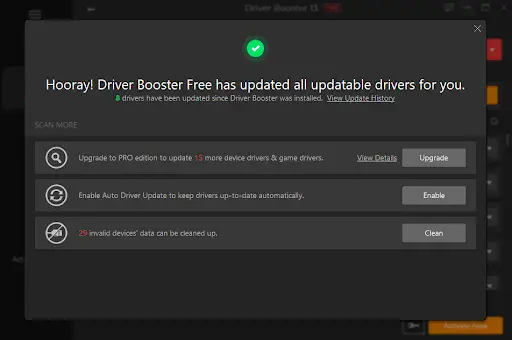
- Within seconds, Driver Booster will update all the outdated drivers. This not only saves valuable time but also ensures your PC runs smoothly without interruptions.
Before installation, the program will automatically create a restore point and backup drivers—ensuring a safe update process.
Part 5: FAQs Related to Driver Booster
- Is Driver Booster Safe to Use?
Yes. Driver Booster is designed with multiple safety layers, including WHQL certification, IObit Test, automatic backups, and system restore points, ensuring updates are secure and reversible.
- Can Driver Booster Update All Drivers Automatically?
Yes, it can scan your system and update all outdated drivers with a single click, saving time and effort.
Final Thoughts
Driver Booster is one of the most famous tools that enables users to update all outdated drivers in a single click. It supports over 18 million drives from 1200+ manufacturers. The best part of this tool is that it’s simple to use and offers a free version, enabling users to update drivers without spending a single penny.