

Streaming and production of online content have been growing these days. Gamers, vloggers and creators usually communicate with their viewers in real time. Visuals and the gameplay are no doubt important here. However, your voice is also significant in keeping viewers entertained. A voice that is unique or fun can give your stream an entertaining and memorable experience.
Moreover, creators are also using voices of characters, humorous effects, or dramatic narration. There are new AI apps that allow you to change your voice in real time. iTop Voicy is a widely used real-time voice changer that is compatible with Windows PCs.
It is an app that allows you to alter your voice whilst you are speaking on games, live videos, conferences, or videos.
iTop Voicy: A Real-Time Voice Changer to Make Your Streams Fun
iTop Voicy is a voice changer for PC users. It uses smart AI technology to change your voice instantly as you speak.
iTop Voicy changes your voice in real time instead of recording your voice and editing it later. When you speak into your microphone, the application adjusts your voice and directs the modified voice to your game, streaming app or chat application.
Since it is real time, it is ideal in various activities. These include voice chat in game discussions, live video streaming or even producing social media videos.
Because it works in real time, it is perfect for different things like talking in game voice chats, live streaming, or even making social media videos. The app is easy to use which makes even beginners to start changing their voice quickly without any tech skills.
With iTop Voicy, you can make your online voice chats and streams more fun and unique.
Why Streamers Use Voice Effects?
Streaming is not just about playing games anymore. Viewers watch streams for fun and to enjoy the streamers personality. Using different voice effects helps streamers
- Add humor to their streams
- Create unique characters
- Make their reactions more dramatic
- Keep viewers entertained
With a voice changer, streamers can switch voices during their stream. For example, they might use a deep narrator voice when telling a story, then switch to a funny cartoon voice while playing. This makes streams more lively and fun to watch.
Key Features of iTop Voicy That Makes it A Popular Choice
Knowing what iTop Voicy can do will show you how it can make your online content better.
Real-Time AI Voice Changer
One of the coolest features is that it changes your voice instantly. When you speak into your mic, the app quickly changes how you sound.
The AI can adjust things like pitch, age style, gender or even tone of voice. It works fast. So, your conversations sound natural without any delay.
Wide Range of Voice Models
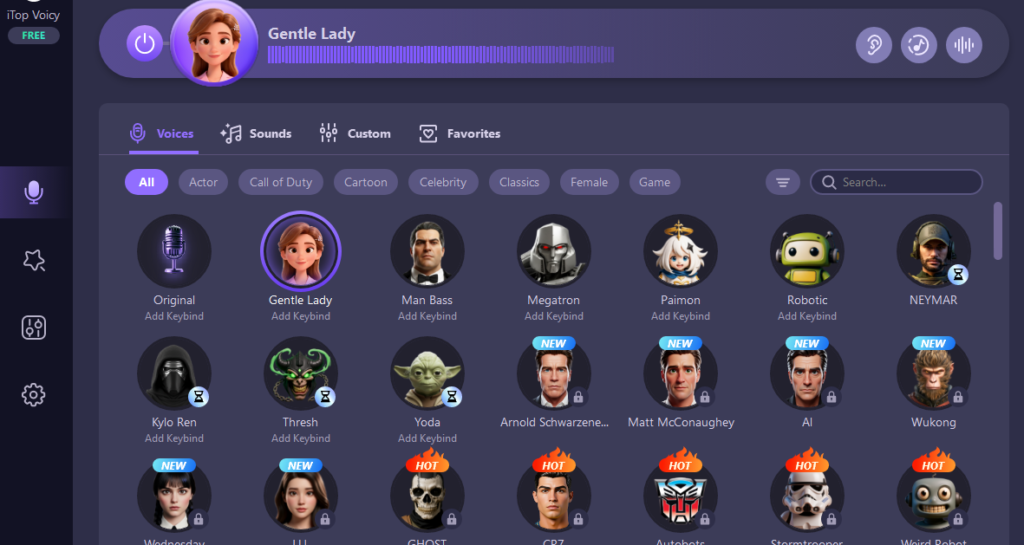
The app has many voice options to try out. Some voices are playful, others are dramatic or robotic. This lets you find the perfect voice for your stream or content.
Switching between voices is easy and ready to use.
One-Click Voice Change for Both Audio and Video
Besides live voice changing, iTop Voicy can also change voices in recordings.
You can import an audio or video file, pick a voice style, and convert the file to add new voice effects. This is great for making storytelling videos or creative clips.
Built-In Voice Recording
You can record your voice directly inside the app while using voice effects. This is useful for
- Recording game commentary
- Creating voice-over clips
- Making podcast episodes
The recorder also has noise reduction to remove background sounds and echoes. It helps in making your recordings sound clear.
Create Your Own Custom Voices
If you want a voice that is different from the built-in options, you can make your own. Upload a voice sample and change settings like pitch, tone, and emotion. Save your new voice to use whenever you want. This helps you create a unique voice for your content.
Works with Games and Chat Apps
iTop Voicy works with many programs that use microphones, such as
- Online games
- Streaming software
- Voice chat apps
- Meeting platforms
Just select iTop Voicy as your microphone, and your changed voice will be used automatically.
How to Use iTop Voicy for Streaming?
Setting up iTop Voicy is quick and easy! Just follow these simple steps to get started.
Download and Install
Go to the official iTop Voicy website and download the program. Open the downloaded file and install it by following on-screen directions. Launch the application once the installation process is completed.
Set Up Your Microphone
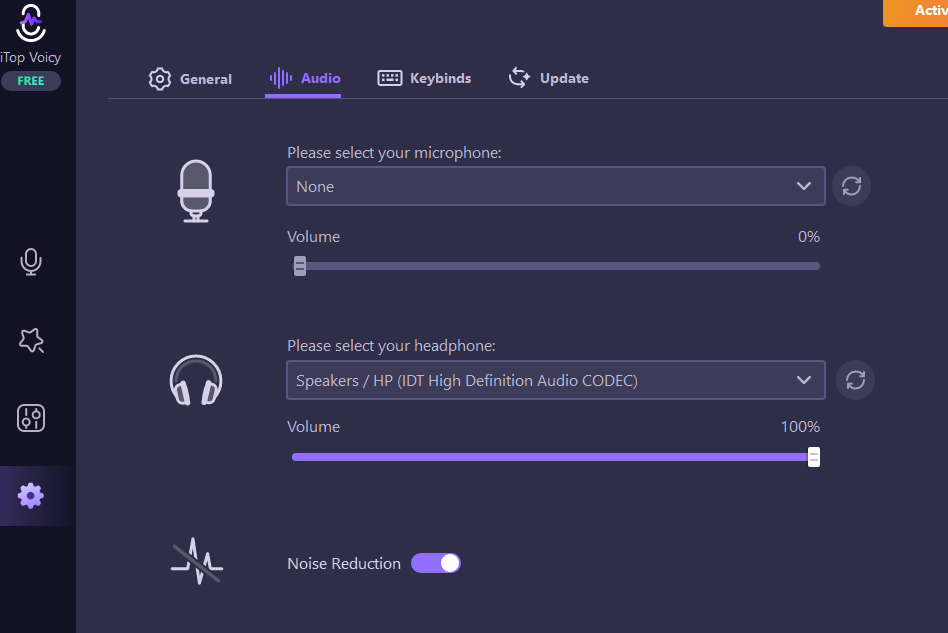
You can see microphone settings on your screen when you launch the application. You can your select your microphone from the list. It would be better to test your mic by seeing the movement in the audio meter to avoid any hassle.
You can even adjust the volume if needed.
Pick Your Required Voice Model
iTop Voicy has a huge library of voice models. You can browse through this library to choose the right option for your streams.
If you are unsure about how the voice would sound, simply hear a preview. Then select the voice you want to use and it will start working instantly.
Connect iTop Voicy to Your Streaming Software
Open the audio or microphone settings in your streaming or chat app. Select iTop Voicy as your microphone input. Save the settings. Now, your changed voice will be heard during your stream.
Start Streaming
Launch your stream or game. Speak normally, and your voice will be changed live. You can switch between different voices anytime to make your stream more fun and entertaining.
It is always important to use a good and clear microphone for the best sound. Also, you should try to stream in a quiet place to avoid background noise. A few small tweaks can make your voice sound even better and keep your viewers hooked.
Conclusion
Streaming and making content online is getting bigger every day. Creators now want new ways to be unique. Voice-changing tools are a fun and easy way to add humor, creativity, and personality to your videos or streams.
iTop Voicy lets you change your voice live without any delay. It is a great tool to make your content stand out and sound more interesting.